
Knowledge Base Article
🗨️How to start a discussion
We’ve recently updated our system, so the way you start a new discussion has changed slightly. We know that any change can be a little confusing at first, but we’re here to help make it as easy as po...
Updated 7 months ago
Version 2.0 948Views
Sign in to react to this post
Daina_BCNA
1 year agoCommunity Manager
Hi Aries ,
Please give us a call on 1800 500 258 and we can talk you through it. Or I can attempt to direct you with some instructions here. Let's see how we go :-)
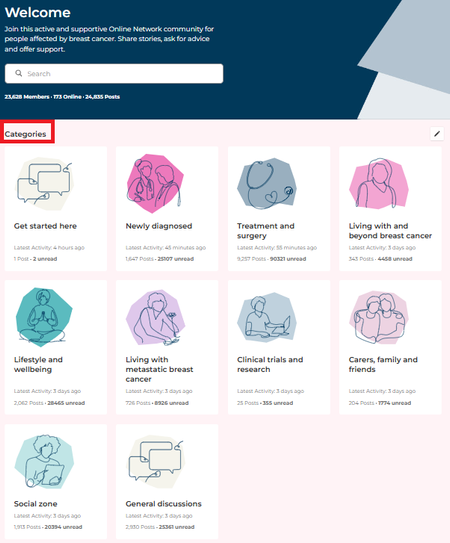
To start a new discussion, you first need to decide which 'Board' you want it to live in. The Boards can be viewed in the Categories list in the header.
You can then choose a Categories e.g.
- Newly diagnosed > early breast cancer
- Treatment and surgery > side effects or
- Lifestyle and wellbeing > Exercise
Once you find the Board you want to post it to, you will see Start a Discussion button
You can then add a Title and enter details to start your discussion
Sign in to react to this post